 Workspace
19 May 2026 · Sarthhak Kaluucha · 12 min read

Workspace
TL;DR
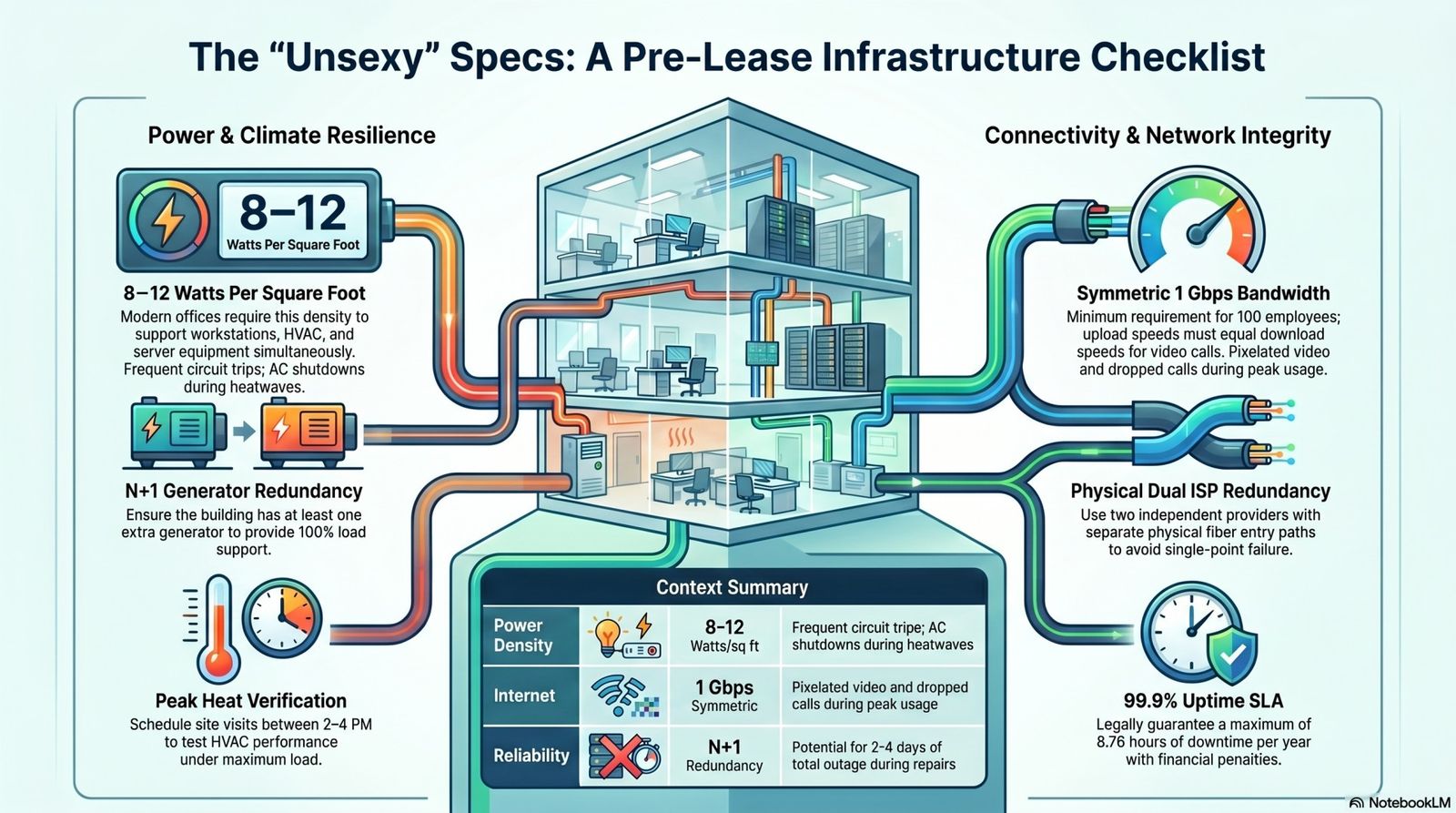
Beautiful office design means nothing if power fails during client calls or internet drops during product demos. Minimum viable infrastructure: 8 watts/sq ft power density, N+1 generator backup, dual ISP with 1 Gbps symmetric fiber, 99.9% uptime SLA. Infrastructure failures cost ₹2-5 lakhs monthly in lost productivity. Verify specifications before signing lease—fixing problems after move-in is expensive or impossible. Listen to this article on
Companies touring Gurgaon office spaces focus on aesthetics: glass partitions, branded reception, trendy breakout zones. Landlords know this. They invest in visible finishes and skimp on invisible infrastructure. Three months after move-in, reality hits. Power trips during monsoon. Internet becomes unusable when entire building maxes out shared bandwidth. Generator can't support full load so AC shuts off during outages. Your beautiful office doesn't work. Infrastructure problems are the #1 reason offices fail operationally. Unlike aesthetic issues, infrastructure can't be fixed with fresh paint. You're stuck with building's power capacity, internet backbone, and backup systems for your entire lease term. Here's what to verify before signing.
Most companies ask "what's the power load?" Landlord says "10 KVA per thousand square feet" and they move on. This tells you almost nothing about whether infrastructure works.
Modern offices need 8-10 watts per square foot minimum. This covers:
Buildings designed pre-2015 often provide only 5-6 watts/sq ft because workloads were lighter. Adding high-density equipment (multiple monitors, powerful workstations, server racks) overloads circuits. GCC operations running 24/7 with engineering workstations need 10-12 watts/sq ft. Standard office buildings can't support this without expensive electrical upgrades landlords won't fund mid-lease.
Power outages in Gurgaon are routine—2-4 hours weekly during summer, longer during monsoons. Your office runs on generator during outages. But most buildings have undersized or non-redundant generators creating problems.
Proper infrastructure has N+1 generator setup: if building needs 500 KVA capacity, it has two 500 KVA generators. One runs, one is on standby. If primary fails, backup starts automatically within 10-15 seconds. Buildings with single generator (N+0) are vulnerable. Generator breaks down, you have zero power for 2-4 days while repair happens. This isn't theoretical—generator failures happen quarterly in older buildings.
Even with redundant generators, verify total capacity supports **full building load simultaneously**. Some buildings have generators sized for 60-70% of peak load assuming "not everyone will be in office." During heatwaves when AC runs at max and occupancy is high, generator can't handle load. AC gets shut off to preserve power for computers.
Beautiful offices with inadequate electrical distribution become unusable once equipment is installed.
"Building has fiber internet" is meaningless. You need to know: Who's the provider? What's the actual bandwidth? Is it symmetric? How many tenants share it? What's the SLA?
Minimum viable bandwidth for modern office:
"Symmetric" means upload speed equals download speed. Asymmetric connections (100 Mbps down, 10 Mbps up) work poorly for video calls, cloud collaboration, and uploading to cloud storage. Everyone on Zoom uploads video simultaneously—10 Mbps upload for 50 people means 200 Kbps per person. Video quality degrades to pixelated mess.
Single internet connection is single point of failure. ISP has maintenance, fiber gets cut during construction, network issues arise. Your entire office goes offline. Proper infrastructure has dual ISP setup: two completely independent internet providers with separate physical fiber paths. If Airtel fiber is cut, Tata fiber keeps working. Automatic failover switches connections in seconds. Many buildings claim "dual ISP" but both connections are from same provider or run through same physical conduit. One construction crew cuts fiber, both connections go down simultaneously.
99% uptime SLA sounds good. It allows 3.6 days of downtime per year. Your office is non-functional for nearly a week annually. This is unacceptable.
Consumer-grade connections (those without SLAs) are inappropriate for business. ISP provides "best effort" with no commitments. Resolution time can be days.
HVAC failures create unusable offices but aren't obvious during tours (building turns on AC for site visits regardless of whether it works at full occupancy).
Modern offices generate significant heat from equipment and people. HVAC must handle:
Buildings designed for 50 sq ft per person (older standard) don't have adequate HVAC for 40 sq ft per person (modern density). More people in same space = more heat. Original HVAC can't cool properly.
Like generators, HVAC needs redundancy. Buildings with single chiller fail catastrophically. Chiller breaks down, entire floor has no AC for days. Proper buildings have N+1 chiller setup: extra capacity so maintenance or failures don't shut down cooling.
Beyond internet connection, internal network infrastructure determines whether office functions efficiently.
Modern offices need network drops (Ethernet ports) at every workstation even if WiFi is primary. Backup wired connections for servers, printers, AV equipment, and critical workstations. Buildings with inadequate cabling infrastructure force you to run surface cables across floors (creating trip hazards and messy appearance) or pay ₹150-250 per meter for new cabling.
Landlords often install minimal WiFi to say "building has WiFi." Real question is: Does it work when 100 people connect simultaneously? Consumer-grade WiFi access points support 20-30 devices maximum. Buildings putting one AP per 2,000 sq ft create connectivity issues at scale.
Before signing lease, complete this technical due diligence:
☐ Calculate watts/sq ft (8 minimum, 10+ preferred) ☐ Verify N+1 generator redundancy ☐ Check generator capacity supports full building load ☐ Count power points per workstation (2+ required) ☐ Ask about circuit distribution (max 4 workstations per circuit) ☐ Review load shedding policies
☐ Confirm bandwidth and symmetry (1 Gbps symmetric minimum for 100 people) ☐ Verify dual ISP with different providers and fiber paths ☐ Review SLA (99.9% uptime minimum) ☐ Check support availability (24/7 preferred) ☐ Understand failover mechanism
☐ Schedule afternoon site visit to test cooling (2-4 PM) ☐ Verify individual zone controls ☐ Check chiller/VRV redundancy ☐ Review maintenance schedule ☐ Ask about fresh air intake rates
☐ Confirm Cat6/Cat6A cabling throughout ☐ Verify network drop at every workstation ☐ Check WiFi AP density (1 per 1,000-1,500 sq ft) ☐ Review equipment specifications ☐ Confirm IT team has control over network
Most infrastructure limitations can't be resolved mid-lease: Building's total power capacity is fixed. Utility company provides X megawatts to building. Landlord can't magically increase it. If building is at capacity, you can't add load. Generator capacity is what it is.Landlords won't install additional generators mid-lease (₹50-80 lakhs investment). You're stuck with existing backup capacity. ISP fiber availability depends on last-mile infrastructure. If building location doesn't have fiber from multiple providers, you can't create dual ISP setup. Geography determines options. HVAC tonnage is designed into building. Adding cooling capacity requires major capital investment landlords won't make for single tenant. This is why infrastructure verification happens before signing, not after move-in. Unlike furniture or paint which can be changed, infrastructure is permanent constraint. 📥 RESOURCE: Download The Ultimate Guide to Gurgaon Office Space for complete infrastructure specification checklists, technical due diligence templates, and vendor evaluation frameworks.

Beautiful office with inadequate infrastructure creates daily operational friction worth ₹2-5 lakhs monthly in lost productivity, workarounds, and employee frustration. Power failures during client calls. Internet degradation during product demos. HVAC struggling during summer afternoons. These aren't minor inconveniences—they're business continuity failures. Proper infrastructure isn't sexy. Nobody tours office and says "wow, look at that N+1 generator redundancy!" But three months post-move-in, infrastructure is what determines whether office actually works. Minimum viable specifications: 8 watts/sq ft power density, N+1 generator backup, 1 Gbps symmetric internet with dual ISP, 99.9% SLA, adequate HVAC with zone controls, enterprise-grade network infrastructure. Verify these during lease negotiation. Infrastructure failures discovered after move-in are expensive or impossible to fix. For companies evaluating office space in Gurgaon and needing guidance on infrastructure requirements for specific operational needs, get in touch with AIHP.
Workspace19 May 2026 · Sarthhak Kaluucha · 12 min read
 Workspace
15 May 2026 · Sarthhak Kaluucha · 14 min read
 Workspace
12 May 2026 · Sarthhak Kaluucha · 14 min read
Ready to move your team?
Fully-managed private offices across Gurgaon's prime corridors — move-in ready, fully serviced, sized for your team.